Start with the selling price.
Margin is the percentage of your selling price that you keep as profit.
35%margin$153.85selling price
Selling price = cost ÷ (1 − margin ÷ 100)
 Sales Margin& Markup
FREE MARGIN & MARKUP CALCULATOR
Good pricing starts with knowing your numbers. Turn your cost into a selling price, see your profit, and leave the guesswork behind.

YOUR NUMBERS, MADE SIMPLE
Editable example · $100 cost at 35% margin
Your figures stay in your browser.
Built for everyday pricing decisions.
SAME PROFIT. A DIFFERENT PERSPECTIVE.
They sound similar. They tell different stories.
Here’s what happens with a $100 cost.
Margin is the percentage of your selling price that you keep as profit.
Selling price = cost ÷ (1 − margin ÷ 100)
Markup is the percentage you add to your cost to arrive at a selling price.
Selling price = cost × (1 + markup ÷ 100)
Subtract cost from selling price: profit = selling price − cost. A $135 selling price and $100 cost give $35 profit.
Markup (%) = margin ÷ (100 − margin) × 100. A 35% margin is approximately 53.85% markup.
Margin (%) = markup ÷ (100 + markup) × 100. A 35% markup is approximately 25.93% margin.
A 35% margin needs a higher selling price than a 35% markup. The calculator shows you both.
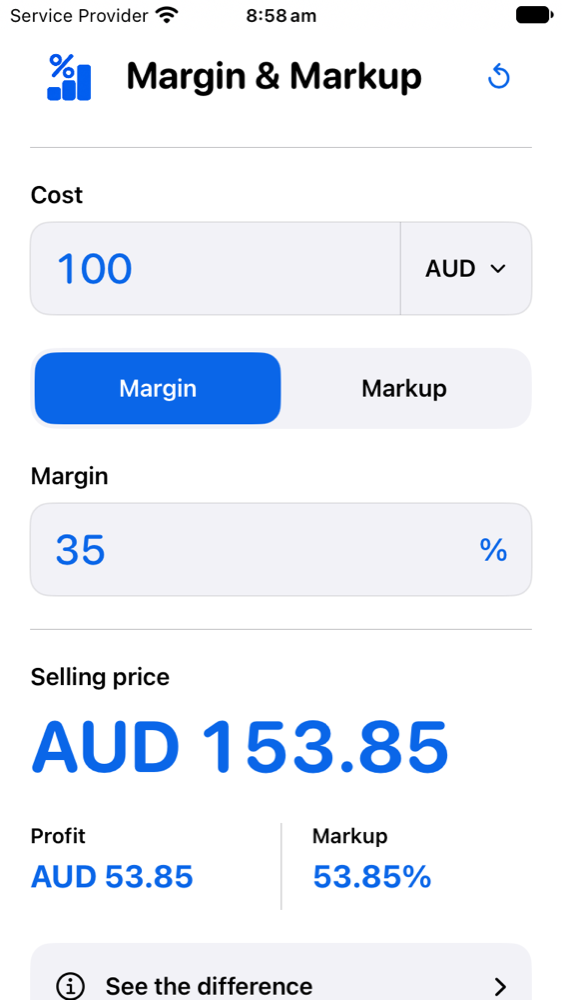
A real app screen. The same $100 example.
MEET THE IPHONE APP
Sales Margin & Markup brings the same clear approach to your iPhone. A focused calculator for the numbers that matter.
Cost, selling price, profit, margin and markup.
Choose how your figures are labelled. No currency conversion.
Built-in explanations of margin, markup and the formulas.
Explore the app here. App Store availability will be confirmed before a download link is added.
A FEW USEFUL ANSWERS
More understanding.
Better pricing decisions.
Yes. Use the website calculator without an account or subscription. The site is designed to be supported by advertising; adverts are disabled on this version of the site.
Use margin when your target profit is a percentage of the selling price. Use markup when you want to add a percentage to your cost. The calculator always shows the equivalent percentage so you can compare them.
No. AUD, USD, GBP, EUR, NZD, CAD, JPY and SGD change labels and display rounding only. There are no live exchange rates. JPY displays whole amounts; the other currencies display two decimal places.
No. The calculator estimates selling price and profit from your entered cost and percentage. It does not add tax, fees or discounts. It models non-negative profit; margin must be below 100%.
Your calculations run in your browser. Figures are not saved across visits or sent to an advertising or analytics service. Read our privacy information for this version of the site.
Markup measures profit relative to cost, so it is undefined when cost is zero and the percentage is positive. Enter a cost above zero, or enter zero for both cost and percentage.
LESS GUESSWORK. MORE CLARITY.